NCICT API Manual
REST request structure, authentication, parameters, examples, and response format for the NCICT application programming interface.
NCICT API
Current documented release: September 9, 2026 Current release type: Maintenance Update Latest scientific update: May 2, 2026
NCICTAPI provides REST-style access to the NCICT4 CT organ dose calculation
workflow. A client sends one JSON object to /param; the server matches the
requested phantom, applies the scanner and scan-range parameters, calculates
organ doses, and returns JSON output.
Cloud endpoint:
POST https://ncict-api.ncidosetools.com/param
Content-Type: application/json
X-API-Key: <assigned vendor API key>
A vendor-specific API key is provided after the commercial licensing agreement is executed.
Local Xojo debug endpoint:
POST http://localhost:8080/param
Content-Type: application/json
X-API-Key: <assigned vendor API key>
Authentication
POST /param requires the API key assigned to the licensed vendor. Send the
key in the X-API-Key request header. Do not include it in the URL or JSON
body. Missing, disabled, or invalid keys return HTTP 401.
The API key is a bearer credential. Store it in an environment variable or a server-side secret manager, and send requests only over HTTPS. Server-to-server integration is recommended. Do not commit the key to source control, write it to application logs, embed it in browser JavaScript, or distribute it inside a desktop or mobile application. Use a vendor-controlled backend as a proxy when the end-user application cannot protect a secret.
The same assigned company key is accepted by NCICTAPI, NCINMAPI, and NCIRFAPI. If a key may have been exposed, stop using it and contact the NCI Dose Tools administrator to have it disabled or rotated. Successful requests are logged under the registered company name; the raw key is not written to the API access log.
Command-Line Example
Save one of the JSON examples below as request.json. For an interactive test,
read the key without placing it in shell history:
read -rsp "NCI Dose API key: " NCIDOSE_API_KEY && printf '\n'
export NCIDOSE_API_KEY

curl https://ncict-api.ncidosetools.com/param \
  -H 'Content-Type: application/json' \
  -H "X-API-Key: ${NCIDOSE_API_KEY}" \
  --data @request.json

unset NCIDOSE_API_KEY
Python Example
Provide NCIDOSE_API_KEY to the Python process through the deployment
environment or secret manager. Do not put the raw key in the source file.
import json
import os

import requests

with open("request.json", encoding="utf-8") as request_file:
    payload = json.load(request_file)

response = requests.post(
    "https://ncict-api.ncidosetools.com/param",
    headers={"X-API-Key": os.environ["NCIDOSE_API_KEY"]},
    json=payload,
    timeout=120,
)
response.raise_for_status()
print(response.json())
JSON Input
The API accepts one JSON object per request. GUI Batch uses CSV format, but it uses the same calculation parameters as the API JSON input. A dose_target field is not required; NCICT infers the dose target from age and whether height is supplied.
JSON numeric literals use dot decimals as required by JSON. Numeric parameters may also be sent as strings using either dot or comma decimal notation. API numeric output uses dot decimals regardless of server or client locale.
Recommended key order for readability:
age, sex, height, weight, wed, start, end, kvp, tcm_strength, head_body, ctdivol, custom_ma
| Parameter | Required | Definition |
|---|---|---|
age | yes | Patient age in years, or gestational age as week text: 8wk, 10wk, 15wk, 20wk, 25wk, 30wk, 35wk, or 38wk. |
sex | required for year-based age | Patient sex. Use f or m. |
height | optional | Patient height in cm. For week-based age, supplying height selects mother dose; omitting height selects fetus dose. |
weight | optional | Patient weight in kg. Used for closest-phantom matching when available. |
wed | optional | Water equivalent diameter in cm. Used for closest-phantom matching when available. |
start | yes | Scan start location from the top of the head in cm, or an anatomical landmark ID from 1001 to 1010. |
end | yes | Scan end location from the top of the head in cm, or an anatomical landmark ID from 1001 to 1010. |
kvp | yes | Tube potential in kVp. |
tcm_strength | yes | Tube current modulation strength from 0 to 1. Use -1 when providing custom_ma. |
head_body | yes | CTDI phantom type. Use 1 for the 16-cm CTDI phantom and 2 for the 32-cm CTDI phantom. |
ctdivol | yes | Volumetric CT dose index in mGy. Values must be greater than or equal to 0. |
custom_ma | required when tcm_strength = -1 | Array of slice-specific mA values. Each value must be greater than 0. |
Phantom Selection Rules
NCICT automatically determines the dose target and phantom group:
| Case | Input | Selection |
|---|---|---|
| 1 | age in years, sex | Patient dose using age/sex reference matching |
| 2 | age in years, sex, wed | Patient dose using WED-based body size matching |
| 3 | age in years, sex, height, weight | Patient dose using height/weight body size matching |
| 4 | age in weeks, omitted height | Fetus dose |
| 5 | age in weeks, supplied height | Mother dose |
Age < 20 is treated as pediatric for patient dose. Age >= 20 is treated as adult.
WED-based Phantom Matching
When age, sex, and wed are provided for patient dose, NCICT first determines the patient phantom group from age and sex:
- age < 20 and
sex = f: pediatric female - age < 20 and
sex = m: pediatric male - age >= 20 and
sex = f: adult female - age >= 20 and
sex = m: adult male
For WED-based matching, NCICT uses the scan range to determine the anatomical region. WED-based matching is applied when start and end match one of the supported landmark ranges:
| Region | start | end |
|---|---|---|
| Chest | 1004 | 1007 |
| Abdomen | 1006 | 1008 |
| Pelvis | 1008 | 1009 |
| AP | 1006 | 1009 |
| CAP | 1004 | 1009 |
For patients 5 years of age or older, NCICT estimates a target body weight from WED using region-, age-, and sex-specific regression equations. A fixed target height is assigned from the age/sex group. For patients younger than 5 years, NCICT uses fixed reference size targets for the newborn and 1-year phantom groups:
| Group | Target height |
|---|---|
| age < 1 year | 47 cm |
| 1 <= age < 5 years | 76 cm |
| 5 <= age < 10 years | 115 cm |
| 10 <= age < 15 years | 145 cm |
| 15 <= pediatric age < 20 years | 165 cm |
| adult female | 165 cm |
| adult male | 175 cm |
For the fixed pediatric groups, the target weights are 4 kg for age < 1 year and 10 kg for 1 <= age < 5 years. The estimated or fixed target weight is limited to the available body size range, and NCICT selects the closest available size-dependent phantom within the same phantom group. The closest phantom is selected by minimizing:
|target height - phantom height| + |target weight - phantom weight|
If the scan range does not match one of the supported WED landmark ranges, NCICT falls back to age/sex-based matching using internally estimated reference height and weight.
Landmark IDs
start and end can be entered either as scan locations in cm or as anatomical landmark IDs, as shown below. If one value is a landmark ID, the other must also be a landmark ID.
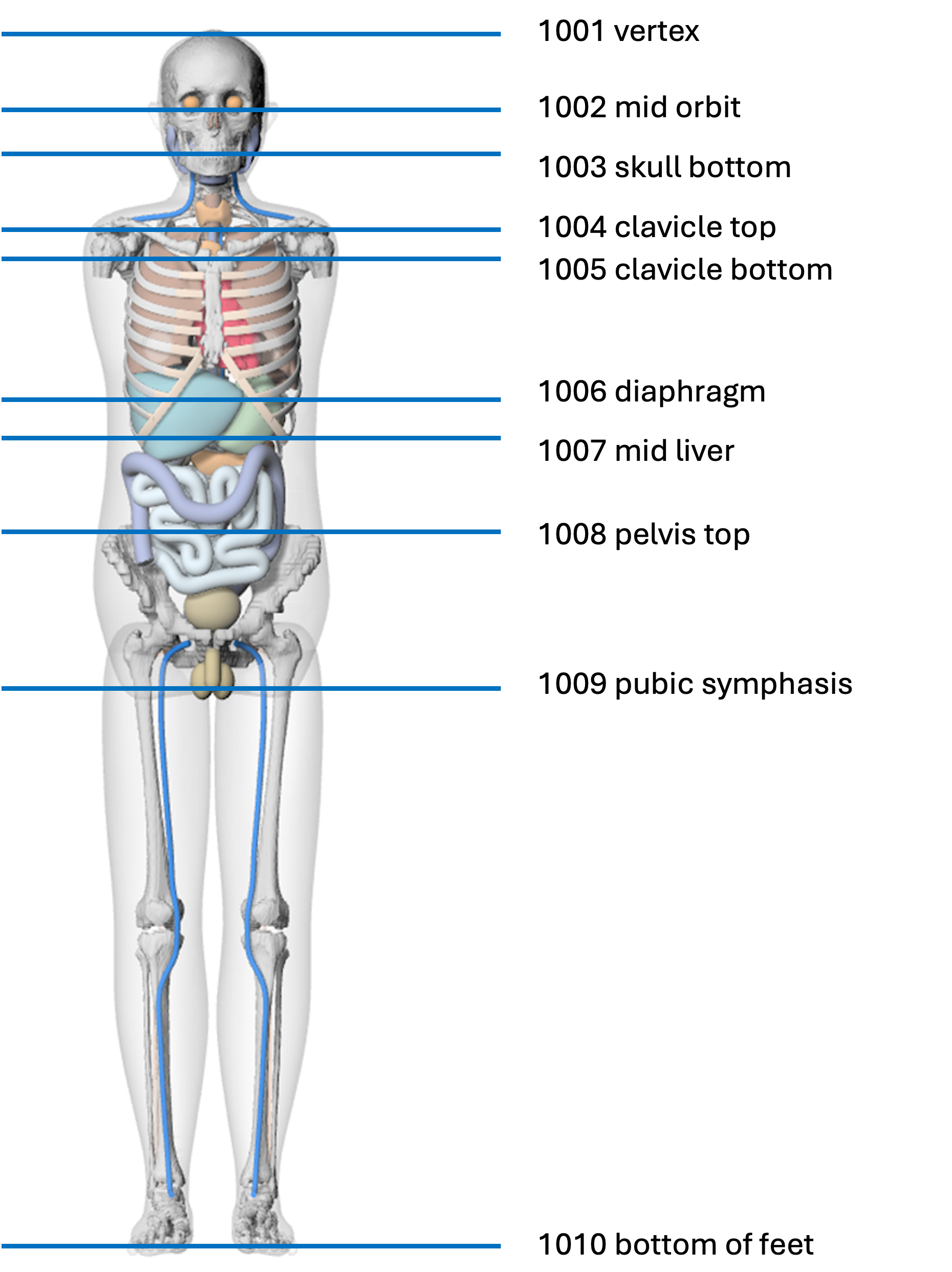
Common protocol ranges can be entered using the following landmark ID pairs:
| Protocol | Start landmark ID | End landmark ID |
|---|---|---|
| Head | 1001 | 1003 |
| Neck | 1002 | 1005 |
| Chest | 1004 | 1007 |
| Abdomen | 1006 | 1008 |
| Pelvis | 1008 | 1009 |
| Abdomen-pelvis | 1006 | 1009 |
| Chest-abdomen-pelvis | 1004 | 1009 |
| Whole body | 1001 | 1010 |
After landmark conversion, the scan range must satisfy:
0 <= start < end <= 190
Example 1: Age and Sex
{
  "age": 10,
  "sex": "f",
  "start": 0,
  "end": 20,
  "kvp": 120,
  "tcm_strength": 0,
  "head_body": 1,
  "ctdivol": 20
}
Example 2: Age, Sex, and WED
{
  "age": 10,
  "sex": "f",
  "wed": 25,
  "start": 0,
  "end": 20,
  "kvp": 120,
  "tcm_strength": 0,
  "head_body": 1,
  "ctdivol": 20
}
Example 3: Age, Sex, Height, and Weight
{
  "age": 20,
  "sex": "m",
  "height": 175,
  "weight": 80,
  "start": 0,
  "end": 20,
  "kvp": 120,
  "tcm_strength": 0,
  "head_body": 2,
  "ctdivol": 20
}
Example 4: Fetus Dose
{
  "age": "38wk",
  "start": 1004,
  "end": 1009,
  "kvp": 120,
  "tcm_strength": 0,
  "head_body": 2,
  "ctdivol": 20
}
Example 5: Mother Dose
Supplying height with a week-based age selects mother dose. The pregnant phantom library uses a matched height of 164 cm.
{
  "age": "30wk",
  "height": 164,
  "start": 1004,
  "end": 1009,
  "kvp": 120,
  "tcm_strength": 0,
  "head_body": 2,
  "ctdivol": 20
}
Custom mA Example
When tcm_strength is -1, custom_ma is required.
{
  "age": 10,
  "sex": "f",
  "wed": 25,
  "start": 0,
  "end": 20,
  "kvp": 120,
  "tcm_strength": -1,
  "head_body": 1,
  "ctdivol": 20,
  "custom_ma": [100, 200, 300, 400, 500, 600, 700]
}
JSON Output
Successful responses return HTTP 200 and a JSON object containing inferred dose target, matched phantom information, and organ doses.
| Metadata key | Definition |
|---|---|
dose_target | Inferred dose target: patient, fetus, or mother. |
age | Patient age in years, or gestational age such as 38wk. |
sex | Patient sex for patient dose. |
phantom_group | Matched phantom group. |
matched_phantom_id | Matched phantom library ID, such as 1050005 or 2050005. |
wed_cm | Input WED in cm, or -1 when WED was not provided. |
matched_height_cm | Matched phantom height in cm. |
matched_weight_kg | Matched phantom weight in kg for patient dose. |
matched_fetal_age_weeks | Matched gestational age in weeks for fetus or mother dose. |
Dose values are returned as JSON numbers without two-decimal rounding, preserving
the precision of the calculated results. Output dose keys include organ doses
in mGy and effective dose msv in mSv. Field names, units, input parameters,
and phantom metadata are unchanged.
Compatibility change in the September 9, 2026 release: earlier versions returned dose values
as two-decimal strings, such as "0.08". Clients must now accept JSON numbers
and should not depend on a fixed number of decimal places. Small nonzero doses
are no longer rounded to "0.00" during response serialization. This correction
to response precision changes the precision and type of the reported values
without altering the underlying calculation algorithms or dose libraries.
The website sandbox provides a readable preview with two decimal places, using three significant digits below 0.01 so small values remain visible. This is display-only formatting. Select Show full-precision JSON to inspect the unrounded response; use the API response, not the rounded preview, for further calculations.
Error Responses
Invalid requests return HTTP 400 with an error message. Common validation errors include:
- missing required input
- missing or invalid
sexfor year-based age - invalid pregnant phantom age format
- invalid
kvp,tcm_strength,head_body, orctdivol - mixed scan range format, such as one landmark ID and one cm location
- invalid scan range after landmark conversion
- missing or invalid
custom_mawhentcm_strength = -1
Server-side calculation or installation problems return HTTP 500 with an error message.