PHANTOM User Manual
Guide to the NCI reference, size-dependent, pediatric, adult, and pregnant computational human phantom libraries.
PHANTOM — NCI Computational Human Phantom Libraries
Current documented release: September 30, 2026 Current release type: Maintenance Update Latest scientific update: August 20, 2026 Latest maintenance update: September 30, 2026
Introduction
PHANTOM is a collection of reference-grade computational human phantom libraries developed by physicists at the National Cancer Institute (NCI) in collaboration with external partners. These phantoms are designed to support population-based radiation dose estimation, benchmarking, and research or regulatory-facing analyses, and serve as the anatomical foundation for NCI dose tools (NCICT, NCINM, and NCIRF).
The PHANTOM libraries represent reference and body size–dependent pediatric, adult, and pregnant populations and are intended for Monte Carlo–based radiation transport simulations, rather than patient-specific clinical modeling.
Intended use PHANTOM libraries are intended for reference dosimetry and computational research. They are not intended for patient-specific clinical treatment planning or site-customized anatomical modeling.
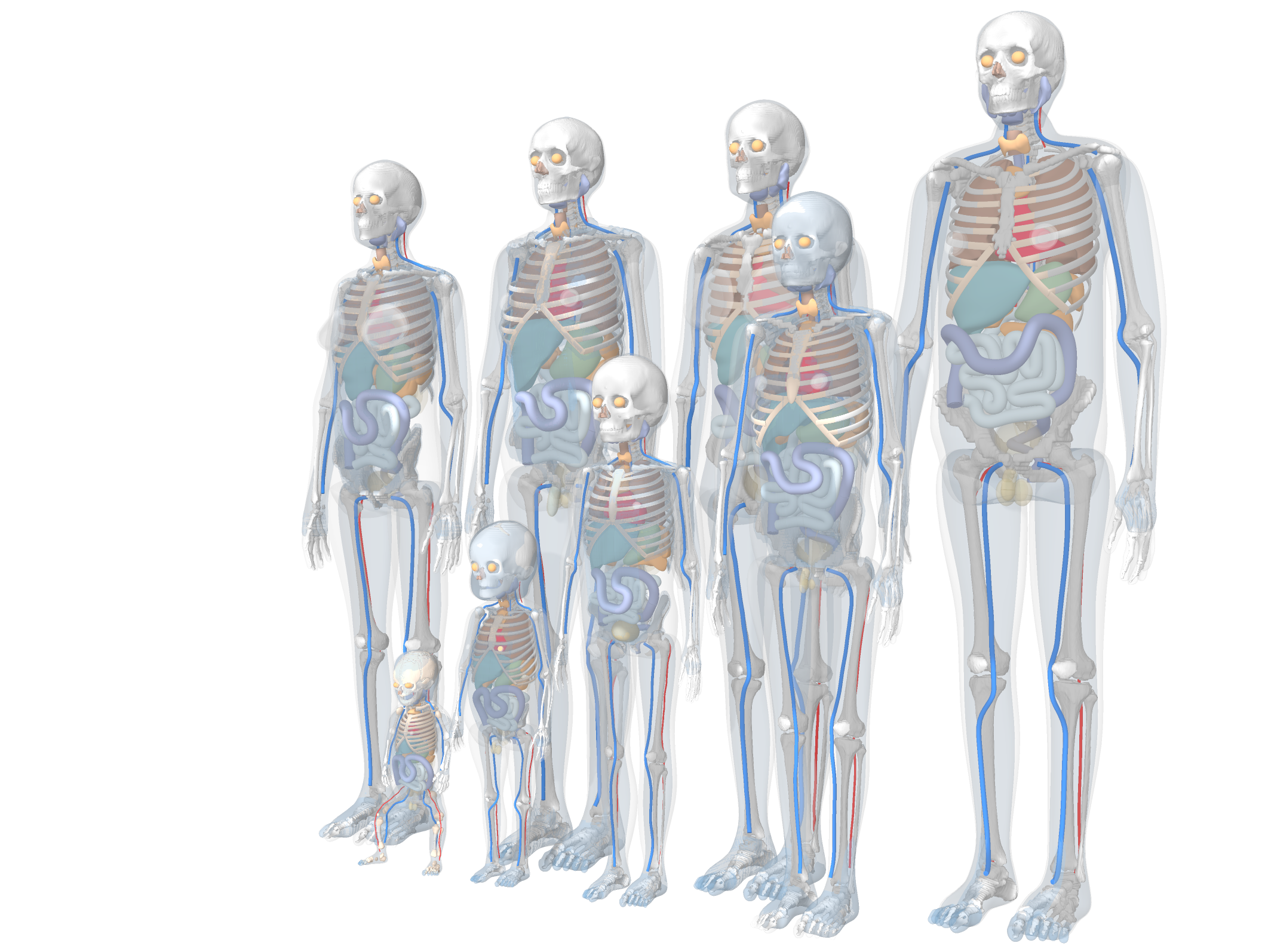
Available Phantom Libraries
The PHANTOM libraries currently available in the release folder are summarized below.
| Release item | UF/NCI reference size phantoms | UF/NCI body size-dependent phantoms | ICRP reference phantoms | UF/NCI pregnant women phantoms |
|---|---|---|---|---|
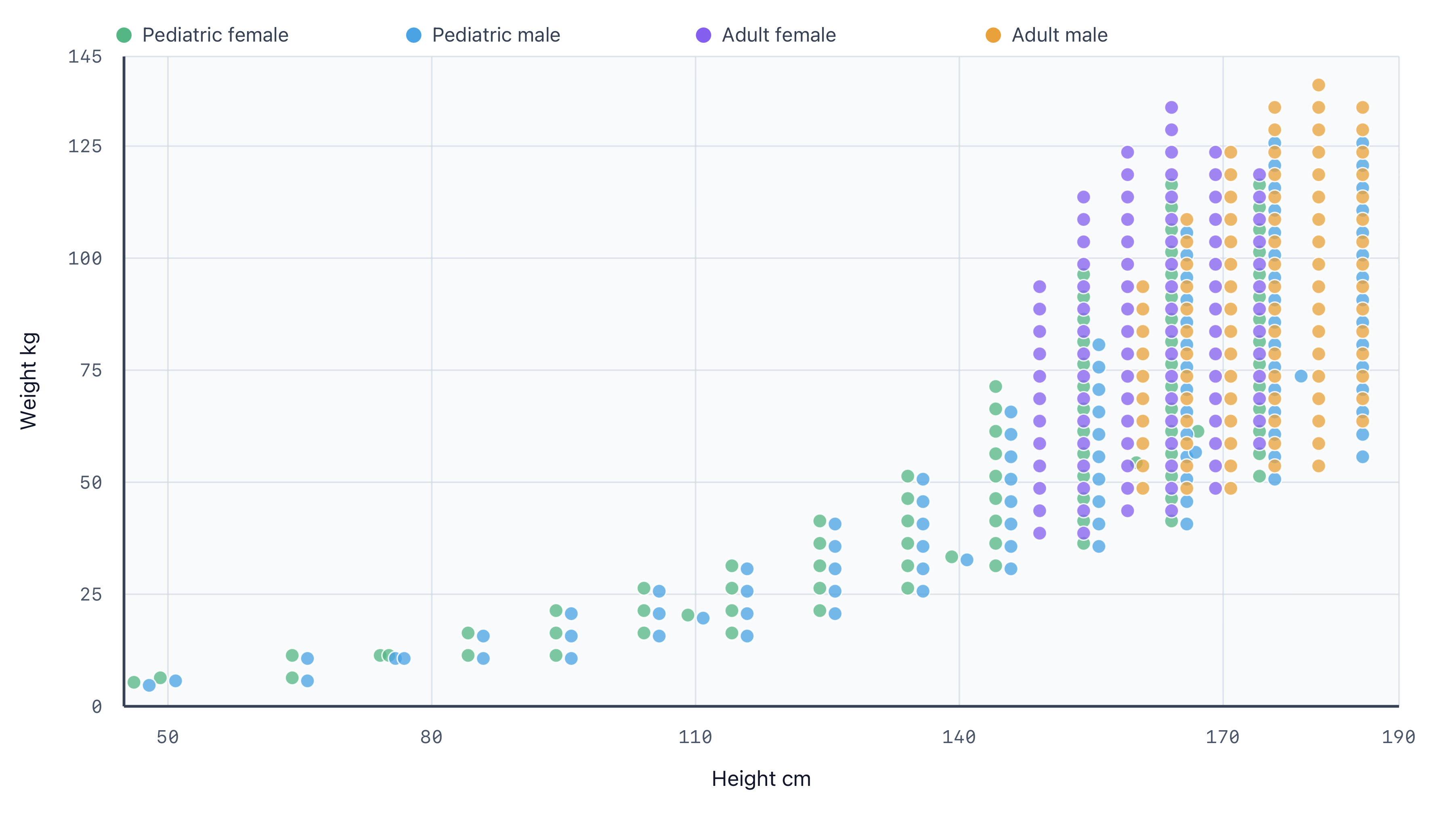
| Distinct subjects | 12 | 362 | 12 | 8 gestational ages¹ |
| Arm variants² | arms and armless | arms and armless | arms and armless | arms and armless |
NIfTI (.nii.gz) | 48 files | 1,448 files | 24 files | 64 files |
| Organ metadata CSV | per NIfTI folder | per NIfTI folder | per NIfTI folder | per NIfTI folder |
| DICOMRT³ | not included | not included | armless only | arm singleres only |
| Monte Carlo input | not included | not included | not included | MCNP, arm/armless multires |
| Reference | Lee 2010 | Geyer 2014 | ICRP 110, ICRP 143 | Maynard 2014 |
¹ The pregnant library includes 8 gestational ages. The singleres release includes cephalic and breech presentations where available. The multires release provides one mother grid and one cephalic finebox per gestational age, plus arm and armless breech fineboxes for 10, 15, 20, and 25 weeks.
² Phantoms with the arms removed are intended for imaging geometries in which the patient’s arms are raised.
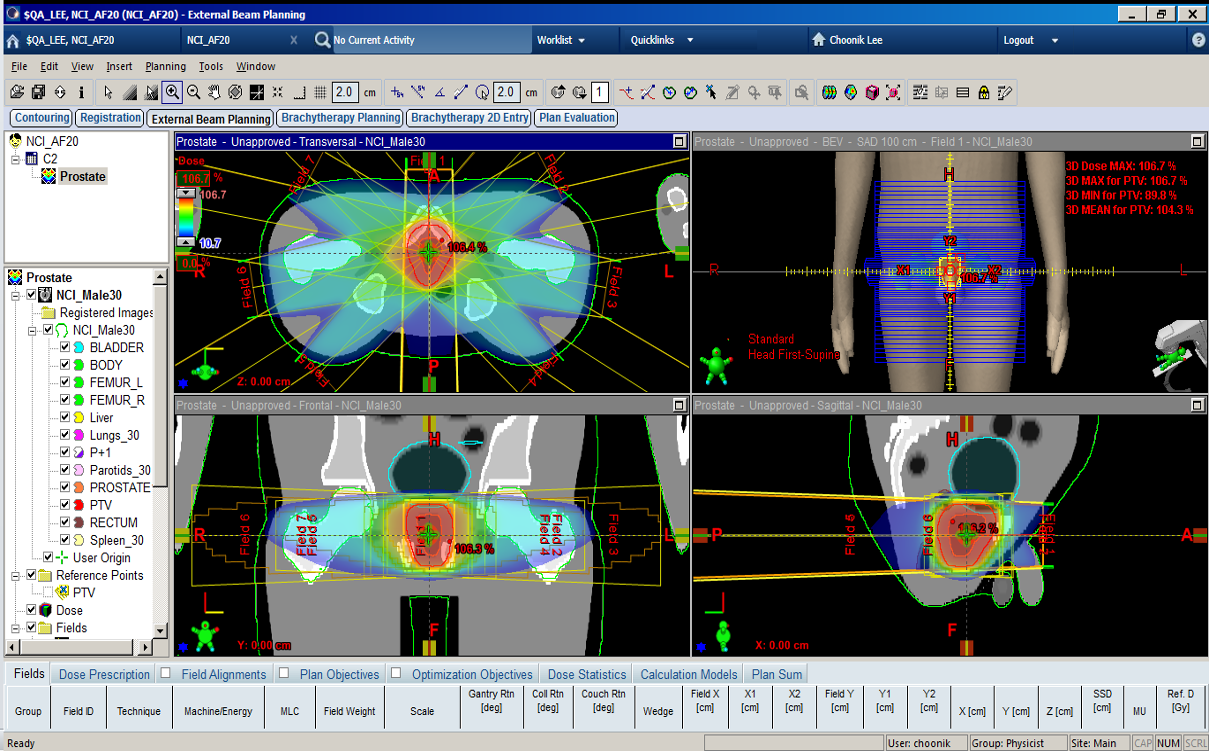
³ DICOMRT files are provided only for selected supported libraries: icrp-reference/armless/dicomrt and nci-pregnant/arm-singleres/dicomrt. DICOM-CT and RT STRUCTURE files can be directly imported into Treatment Planning Systems (TPS). Recommended citation for DICOMRT files: Griffin 2019
Selected DICOM CT and RT Structure Set libraries can be imported into compatible treatment-planning systems for visualization and supported research workflows.
Folder Naming Convention
The PHANTOM download directory uses a phantom-library folder first, followed by the arm posture and resolution layout used by that library.
NCI reference-size and body size-dependent phantoms use:
nci-reference/{arm-highres,arm-lowres,armless-highres,armless-lowres}
nci-size/{arm-highres,arm-lowres,armless-highres,armless-lowres}
The NIfTI files and organ-metadata.csv are stored directly in each of these
posture/resolution folders.
The pregnant woman library uses:
nci-pregnant/arm-singleres
nci-pregnant/armless-singleres
nci-pregnant/arm-multires
nci-pregnant/armless-multires
The singleres folders contain one complete label map per phantom. The multires
folders contain paired native grids: a complete coarse mother grid and native
finebox grids for the fetus region. Cephalic fineboxes are named explicitly;
both multires variants also include presentation-specific breech fineboxes for
10, 15, 20, and 25 weeks.
For the pregnant library, arms means that the complete maternal upper
extremities are represented, including the humeri, radii, ulnae, wrists, hands,
associated soft tissues, and skeletal subregions. The maternal mother grid is
shared by the cephalic and breech multires cases for the same gestational age;
the presentation-specific anatomy is supplied by the corresponding finebox.
The ICRP reference library uses:
icrp-reference/arm
icrp-reference/armless
icrp-reference/armless/dicomrt
The arms-present ICRP NIfTI files are stored directly under icrp-reference/arm.
The armless ICRP NIfTI files are stored directly under icrp-reference/armless,
and the armless DICOMRT ZIP files are stored under
icrp-reference/armless/dicomrt.
Not every library includes every format. Monte Carlo input folders in the current release are:
nci-pregnant/arm-multires/mcnp-input
nci-pregnant/armless-multires/mcnp-input
Master Table
The release includes phantom-mastertable.xlsx at the root of the PHANTOM download folder. This workbook summarizes organ masses and shared material, marrow-fraction, and skeletal dose-response data for the current NCI reference, NCI body size-dependent, NCI pregnant, and ICRP reference releases.
The workbook includes the following sheets:
- Information Library naming, units, metadata notes, and release conventions.
- Ref Arms High, Ref Arms Low, Ref Armless High, Ref Armless Low NCI reference-size organ masses by posture and resolution.
- Size Arms High, Size Arms Low, Size Armless High, Size Armless Low NCI body size-dependent organ masses by posture and resolution.
- Preg Ceph Arms, Preg Ceph Armless, Preg Breech Arms, Preg Breech Armless NCI pregnant singleres organ masses by fetal presentation and arm status.
- ICRP Arms, ICRP Armless ICRP reference organ masses by arm status.
- Materials, Marrow Fractions, DRF Active Marrow, DRF Endosteum Shared material composition, skeletal marrow fraction, and skeletal dose-response tables.
Each NIfTI folder also contains an organ-metadata.csv file with the per-organ tag, material, density, voxel count, volume, and mass values used to build the workbook. Machine-readable shared tables are stored under the common/ folder:
common/elemental-composition.csv
common/marrow-fraction.csv
common/skeletal-dose-response.csv
These tables ensure consistent, reproducible mapping between voxelized anatomy, material definitions, and dosimetric response functions across NCI dose tools.
Monte Carlo Input Files
Monte Carlo input files are included for the pregnant arm and armless multires libraries:
nci-pregnant/arm-multires/mcnp-input
nci-pregnant/armless-multires/mcnp-input
The arm and armless folders both use one combined input deck per week plus explicit presentation lattice names:
XXwk.inp                # combined mother and fetal tallies
XXwk-cephalic.lat       # default cephalic geometry
XXwk-breech.lat         # 10, 15, 20, 25 weeks only
Each .inp file defaults to the cephalic lattice and includes commented
read file= alternatives for cephalic and breech lattices where available.
Change the active read file= line near the top of the deck to switch fetal
presentation. Each .lat file contains the complete coarse mother lattice and
the native finebox lattice used by the multires NIfTI release.
These inputs are provided as reference starting points for established MCNP workflows. Users should review and modify local file paths, source definitions, scoring setup, compiler settings, and code-version assumptions before running simulations.
NIfTI (.nii.gz) Voxel Phantom Files
NIfTI (.nii.gz) is the recommended format for newly downloaded voxel phantom files.
Each file is a gzip-compressed NIfTI image containing the 3D integer voxel-label array
for one phantom. The voxel values correspond to organ or tissue tag numbers used by
the PHANTOM master table.
The current NIfTI release is organized as follows:
Reference-size phantoms:
- nci-reference/arm-highres
- nci-reference/arm-lowres
- nci-reference/armless-highres
- nci-reference/armless-lowres
Body size–dependent phantoms:
- nci-size/arm-highres
- nci-size/arm-lowres
- nci-size/armless-highres
- nci-size/armless-lowres
Pregnant woman phantoms:
- nci-pregnant/arm-singleres
- nci-pregnant/armless-singleres
- nci-pregnant/arm-multires
- nci-pregnant/armless-multires
ICRP reference phantoms:
- icrp-reference/arm
- icrp-reference/armless
Current NIfTI counts by folder:
nci-reference/arm-highres:       12
nci-reference/arm-lowres:        12
nci-reference/armless-highres:   12
nci-reference/armless-lowres:    12

nci-size/arm-highres:           362
nci-size/arm-lowres:            362
nci-size/armless-highres:       362
nci-size/armless-lowres:        362

icrp-reference/arm:              12
icrp-reference/armless:          12

nci-pregnant/arm-singleres:      12
nci-pregnant/armless-singleres:  12
nci-pregnant/arm-multires:       20
nci-pregnant/armless-multires:   20
Current filename patterns:
nci-reference:  {phantom_id}-{highres|lowres}-{arms|armless}.nii.gz
nci-size:       {phantom_id}-{arms|armless}-{highres|lowres}.nii.gz
icrp-reference: icrp-{age}{sex}-{arms|armless}.nii.gz
nci-pregnant singleres: XXwk-{cephalic|breech}-{arm|armless}.nii.gz
nci-pregnant multires mother:  XXwk-mother.nii.gz
nci-pregnant multires fetus:   XXwk-fetus-{cephalic|breech}.nii.gz
For pregnant multires folders, the mother file is the complete coarse lattice. The fetus file is the native finebox lattice in the same world-coordinate frame. The finebox replaces the corresponding region of the coarse mother grid and should not be added as a separate full-phantom volume. Cephalic fineboxes are available for all gestational ages; breech fineboxes are available for 10, 15, 20, and 25 weeks.
NIfTI was adopted as the recommended distribution format for several reasons:
- NIfTI is a standard medical-imaging format that can be opened directly by common tools such as 3D Slicer, ImageJ/Fiji, ITK-SNAP, MATLAB, and Python packages.
- NIfTI headers store image dimensions, voxel spacing, data type, and orientation information, while raw binary files require separate metadata to be interpreted correctly.
- Compressed NIfTI files are smaller and easier to transfer than the corresponding raw binary voxel files.
- The raw binary representation of a full high-resolution phantom library can be
extremely large. The compressed
.nii.gzformat makes distribution through the secure User Portal practical while preserving the integer organ-label voxel data.
What Information Is Included
Each NIfTI file stores:
- 3D voxel-label data The image array contains integer organ or tissue labels. A voxel value should be interpreted as a label ID, not as CT number, attenuation, or density.
- Image dimensions The number of voxels along each image axis is stored in the NIfTI header.
- Voxel spacing The physical voxel size is stored in the NIfTI header and can be read by standard NIfTI-compatible software.
- Data type The label array is stored as an integer image. When processing the files, preserve the integer labels and avoid interpolation unless a label-preserving method is used.
- Spatial orientation information NIfTI headers include affine/orientation information used by visualization and image processing software.
- Label-map intent
Current files use NIfTI
labelintent names that identify the library family:NCI_PHANTOMfor NCI reference-size and body size-dependent files,NCI_PREGNANTorNCI_PREG_MRESfor pregnant files, andICRP_LABELSfor ICRP files. Spatial units are millimeters, and qform and sform contain the voxel-to-physical-space affine. - Embedded JSON metadata Current NIfTI files contain a compact UTF-8 JSON extension. This structured metadata identifies the library, phantom, arm status, resolution profile, subject dimensions, metadata version, and label conventions. The filename repeats the principal selection fields for human readability, but software should use the embedded JSON rather than relying only on filename parsing.
For example, 00f050005-arms-highres.nii.gz contains metadata equivalent to:
{
  "schema": "nci-phantom/1",
  "metadata_id": "nci-size-2026.08",
  "library": "nci-size",
  "phantom_id": "00f050005",
  "arm_status": "arms",
  "resolution_profile": "highres",
  "subject": {
    "age_years": 0,
    "sex": "female",
    "height_cm": 50,
    "weight_kg": 5
  },
  "labels": {
    "background_tag": 0,
    "skin_tag": 43
  }
}
The first two characters of an NCI phantom ID are the representative age in years.
The canonical reference-adult code is 35, following the ICRP reference-adult
convention; for example, 35f165060 identifies the adult female phantom with a
height of 165 cm and a weight of 60 kg. Previous adult codes are not used in the
current release.
The current metadata schemas are:
nci-reference, nci-size: nci-phantom/1
nci-pregnant:           nci-pregnant/1
icrp-reference:         icrp-phantom/1
The NIfTI header is authoritative for dimensions, data type, voxel spacing, units, and affine transforms. The embedded JSON is authoritative for phantom identity and the versioned link to domain metadata.
The NIfTI file does not replace the metadata tables. Organ names, material assignments, tissue densities, elemental compositions, and marrow or dose-response data should be obtained from each folder's organ-metadata.csv file, phantom-mastertable.xlsx, and the shared common/ CSV files.
Reading NIfTI Files
3D Slicer
- Open 3D Slicer.
- Use Add Data or drag the
.nii.gzfile into the Slicer window. - Load the file as a volume. For label-based visualization, set or convert the volume to a label map as needed.
- Use the volume display or segmentation tools to inspect individual label regions.
Because PHANTOM files are label images, avoid smoothing or linear interpolation when resampling. Use nearest-neighbor interpolation for any label-preserving operation.
ImageJ / Fiji
- Open ImageJ or Fiji.
- Import the
.nii.gzfile using a NIfTI-compatible importer, such as the NIfTI plugin or Bio-Formats importer, depending on the local installation. - Inspect the image stack as a 3D label volume.
- Use thresholding or label-value selection to isolate a specific organ ID.
When using ImageJ/Fiji, keep the image as an integer label image where possible. Some operations may convert the data to floating point; this is acceptable for display but should be avoided for saving label-preserving phantom data.
ITK-SNAP
- Open ITK-SNAP.
- Load the
.nii.gzfile as the main image. - Use the label-inspection tools to identify voxel values and inspect organ regions.
Python
The recommended Python package for reading NIfTI files is nibabel.
import nibabel as nib
import numpy as np

nii_path = "35f165060-armless-highres.nii.gz"
img = nib.load(nii_path)

# Preserve integer labels. Avoid get_fdata() unless floating-point data are desired.
labels = np.asanyarray(img.dataobj)

print("shape:", labels.shape)
print("voxel spacing:", img.header.get_zooms()[:3])
print("data type:", labels.dtype)
print("affine:")
print(img.affine)

organ_id = 43
organ_mask = labels == organ_id
print("organ voxel count:", int(organ_mask.sum()))
MATLAB
MATLAB can read NIfTI files with niftiread and inspect header metadata with
niftiinfo.
info = niftiinfo("35f165060-armless-highres.nii.gz");
labels = niftiread(info);

disp(size(labels))
disp(info.PixelDimensions)
disp(class(labels))

organ_id = 43;
organ_mask = labels == organ_id;
nnz(organ_mask)
Converting Legacy Binary Voxel Files to NIfTI
Legacy binary voxel files are not included in the current PHANTOM release folder. Users who have older raw binary phantom files can still convert them to NIfTI if the required geometry metadata are known. These files are raw arrays and do not carry their own metadata. To convert a binary file to NIfTI, the following information must be known from the phantom documentation or master table:
- array dimensions, e.g., number of voxels in x, y, and z
- voxel spacing in physical units
- integer data type, such as
uint16orint32 - byte order
- array storage order and orientation
Example Python conversion:
import nibabel as nib
import numpy as np

binary_path = "phantom.raw"
nii_path = "phantom.nii.gz"

# Replace these values with the dimensions and voxel spacing for the phantom.
shape = (512, 256, 180)       # x, y, z
spacing = (1.0, 1.0, 1.0)     # mm
dtype = np.dtype("<u2")       # little-endian unsigned 16-bit integer

data = np.fromfile(binary_path, dtype=dtype)
data = data.reshape(shape, order="C")

affine = np.diag([spacing[0], spacing[1], spacing[2], 1.0])
img = nib.Nifti1Image(data, affine)
img.header.set_data_dtype(data.dtype)
nib.save(img, nii_path)
The shape, spacing, dtype, and array order must match the original binary
phantom. If these values are incorrect, the converted NIfTI file may open but the
anatomical labels can be transposed, flipped, or assigned to the wrong physical
locations.
Converting NIfTI Back to Raw Binary
Some Monte Carlo pipelines may still require raw binary input. A NIfTI label image can be exported back to a raw binary array after confirming the required data type and array order for the target code.
import nibabel as nib
import numpy as np

img = nib.load("phantom.nii.gz")
labels = np.asanyarray(img.dataobj)

# Match the data type expected by the receiving Monte Carlo workflow.
labels = labels.astype(np.uint16, copy=False)
labels.tofile("phantom.raw")
After conversion, confirm the voxel count, unique label values, and organ-label mapping against phantom-mastertable.xlsx before using the file for dose calculation.
Features Under Development
The following enhancements are under active development and may be released in future versions:
- Additional organ substructure models beyond the current cardiac substructure release (e.g., brain substructures)
- Implementation of lymphatic node models in the body size–dependent phantom library